Figma Code Connect · Carbon Integration
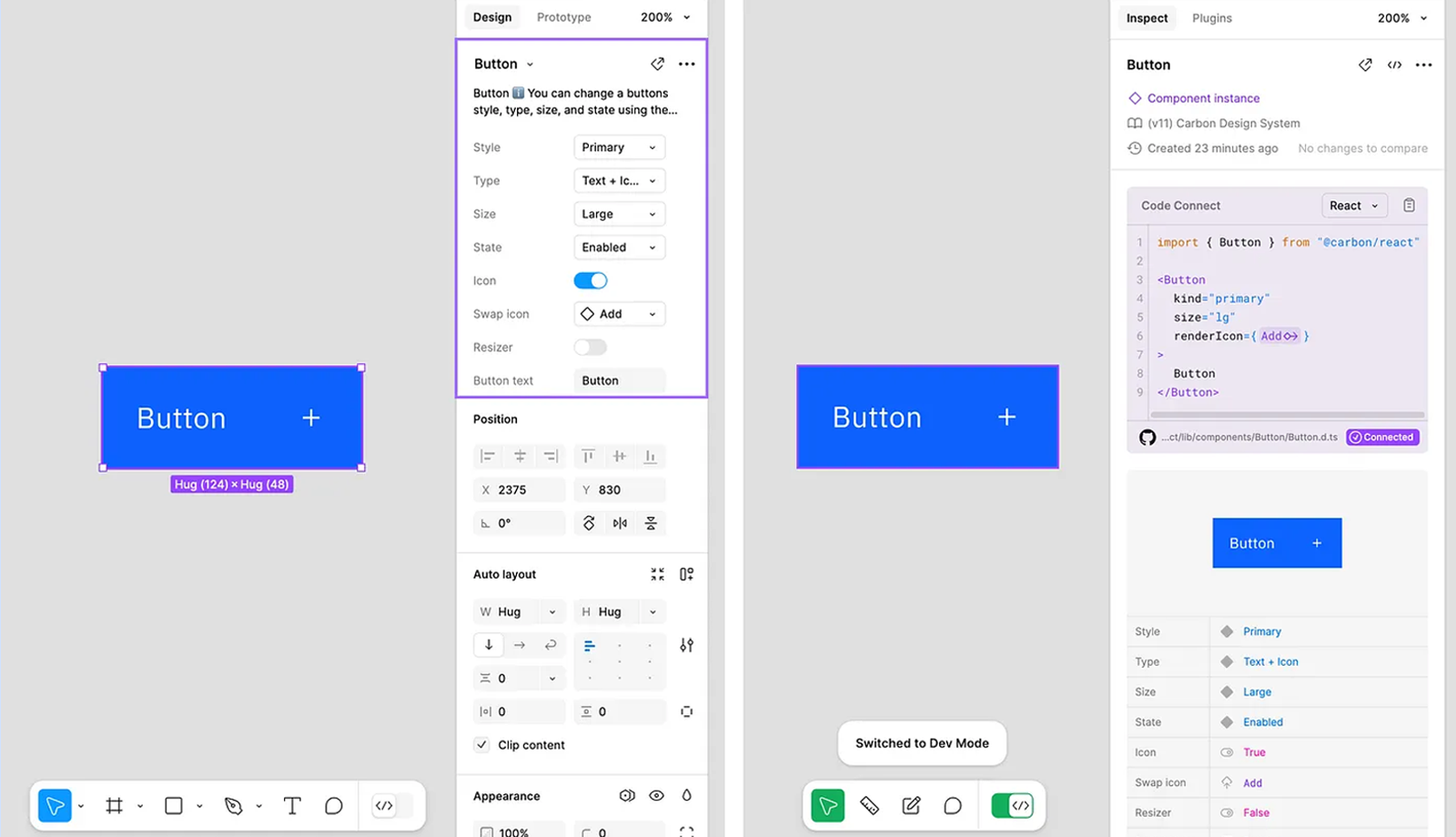
Code Connect bridges the gap between design and development by making design system component code directly accessible in Figma's Dev Mode. This integration allows developers to view real Carbon React code within Figma, ensuring consistency and accuracy throughout the design-to-code process.
Carbon and Figma Code Connect: Redefining the Design-to-Code Experience
Summary
Led the integration of Carbon React with Figma Code Connect, embedding React component code directly into Figma's Dev Mode. This closed the gap between design and development by letting teams access real Carbon code without leaving Figma, reducing context switching and guesswork during handoff. The integration also powers a new generation of design-to-code AI plugins in Figma, where Carbon's connected components provide the underlying source of truth for generating more accurate code.
Background
The Challenge: The gap between design and development created inefficiencies for product teams. Designers handed off specs that required interpretation, while developers referenced separate documentation, Storybook, or code repositories. This back-and-forth increased the risk of errors and led to inconsistent user experiences.
The Opportunity: Figma's launch of Code Connect in Dev Mode provided a chance to bring live component code directly into the design tool. For Carbon, this meant developers could see and copy real React code directly from Figma components, streamlining workflows and ensuring consistent implementation. The same connected code now serves as the foundation for AI-driven design-to-code plugins.
My Role: As the technical lead, I owned the integration strategy, component mapping, and automation setup while partnering directly with Figma's team during the beta phase.
Approach
Systematic Component Mapping: Created an epic in Github and opened an issue for each component in the Carbon React library. Worked through them systematically, mapping each Figma component to its React counterpart in @carbon/react to ensure consistency and trackable progress.
Beta Partnership: Collaborated directly with the Figma team throughout the process, providing feedback, reporting issues, and validating fixes to help shape the feature as it matured toward GA.
Challenges
Component Name Mismatches: Component names and structures often differed between Figma and React. Code Connect's explicit mapping capability allowed us to align components and handle variants, mapping one Figma component to multiple React components or vice versa without losing accuracy.
Library Inconsistencies: The mapping process revealed inconsistencies between the Figma library and React components, including missing props. We tracked these issues across both libraries and fixed them as part of the work, strengthening the underlying system.
Maintaining Sync: Built Code Connect updates into our definition of done and educated designers on what constitutes a breaking change in Figma. This ensured that whenever the Figma library was updated, the Code Connect mappings were updated in parallel.
Beta Instability: Working with Code Connect in beta presented hurdles from unexpected bugs to evolving functionality. Maintained direct connection with the Figma team, providing feedback and validating fixes as they rolled out to help stabilize the feature for Carbon at scale.
Outcomes
Developer Efficiency:
- Gave developers direct access to accurate React code inside Figma, reducing context switching and eliminating guesswork during handoff
- Made implementation faster and more consistent, helping teams translate design intent into production code with greater confidence
Sustainable Process:
- Established repeatable workflows by baking Code Connect updates into definition of done and educating designers on breaking changes
- Reduced risk of drift between Figma library and React components through automated sync process
AI-Powered Future:
- Laid the foundation for AI-driven design-to-code workflows where Carbon's connected components serve as single source of truth
- Enabled Figma plugins to generate more accurate code automatically, positioning Carbon as an enabler of intelligent, AI-assisted tooling